
Browse data products #
The Data products pane lets you view and use all of the curated datasets from your organization.
Accounts with data products to view can use the Search data products text field to find data products by name or by the contents of their summaries.
View data products #
You can view your data products in a card grid layout or a list view that shows each data product’s name, publisher, summary, and contacts.
In grid view, Query data: Opens the underlying schema in the query editor.
Click themore_vert options menu to perform the following tasks related to the data product:
- Connection info: Opens the Connection info dialog that displays connection information.
- Go to schema: Opens the underlying schema in the catalog explorer.
To view your data products in a grid, click apps
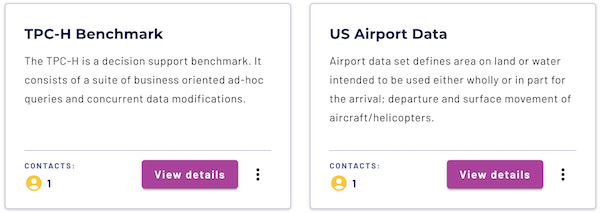
In list view, click themore_vert options menu to perform the following tasks related to the data product:
- Connection info: Opens the Connection info dialog that displays connection information.
- Query data: Opens the underlying schema in the query editor.
- Go to schema: Opens the underlying schema in the catalog explorer.
To switch to list view, click view_list

In grid view, click inside the data product’s card to navigate to the details pane. In list view, click the name of the data product to view the details pane.
Data product details #
The data products details pane lets you view detailed information about the currently selected data product, including its description, metadata, and the underlying schema details.
Click Go to schema to navigate to the underlying schema in the catalog explorer.
To query the underlying schema in the query editor, click Query data.
In addition to the standard tasks, themore_vert options menu includes the following management options:
- Edit data product: Opens the Edit data product pane.
- Delete data product: Opens a confirmation dialog to delete the data product. Click Yes, delete to delete the data product, or No, do not delete to cancel. Deleting a data product cannot be undone. Deleting the data product does not affect the underlying schema.
The data products details pane is organized into Overview, Datasets, and Usage examples tabs.
Overview #
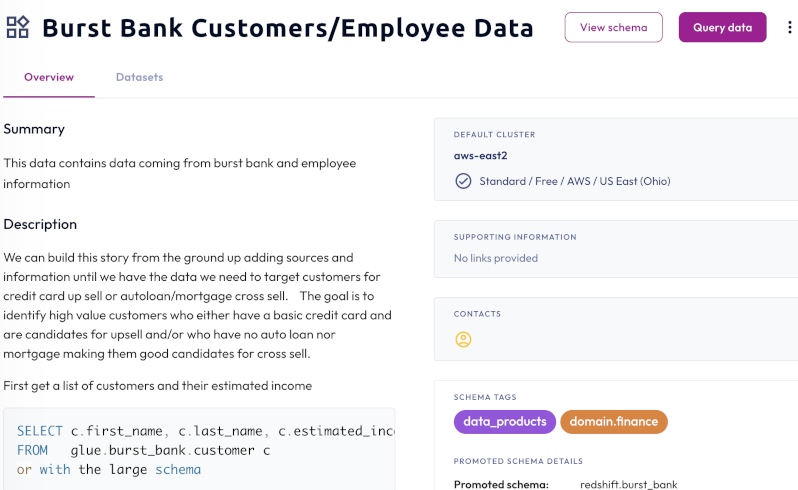
The Overview tab displays the summary and description of your data product. In addition to the details related to each topic, the tab includes the following details:
- Default cluster: Lists the default cluster for the data product.
- Supporting information: Lists relevant web links defined at creation of the data product, or imported from the underlying schema.
- Contacts: Lists users assigned as contacts defined at creation of the data product, or imported from the underlying schema.
- Schema tags: Lists tags assigned to the underlying schema. Tags in data products are read-only.
- Promoted schema details: Lists information about the underlying schema:
- Promoted schema: The name of the underlying schema with the name of its catalog preceding it.
- Owner: The owning role for the underlying schema.
- Data products details: Lists information about the data product:
- Created on: The timestamp of the date of creation.
- Created by: The user who created the data product.
- Last updated on: The timestamp for when the data product was last updated.
- Last updated by: The user who last updated the data product.
Datasets #
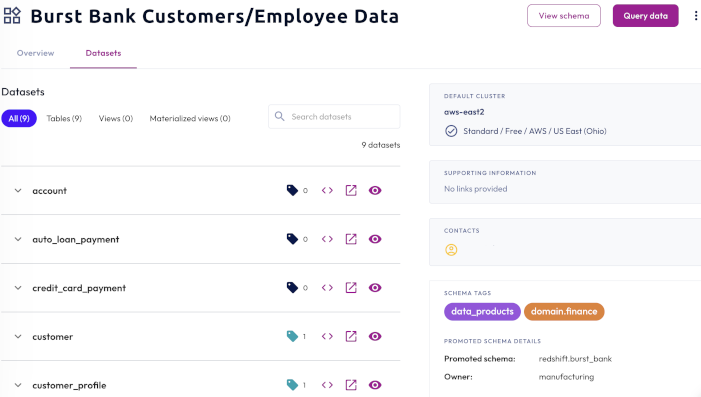
The Datasets tab displays all the datasets in the data product. Click a dataset category to limit results to show only Tables, Views, or Materialized views.
Each line item contains interactive icons that perform the following actions:
- sell Displays the number of tags that are associated with the dataset. Hover to view tag names.
- code Brings you to the query editor where you can query the data.
- open_in_new Brings you to the table level in the catalog explorer.
- visibility Shows a preview of the dataset. The result set is limited to 10.
Usage examples #
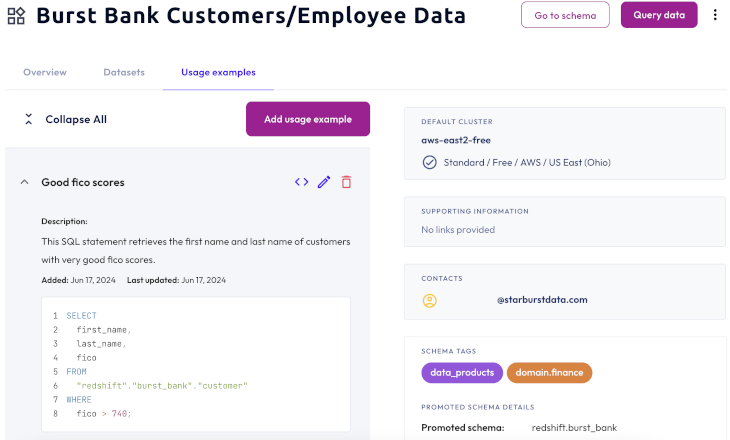
Use the Usage examples tab to provide use-case examples and code snippets that can help users understand and explore a data product.
To provide examples, click Add usage example. In the dialog, provide a meaningful name, description, and query example. Click Save.
Usage examples are available in a collapsible list and contain information about the example, such as when the example was added and last updated.
Is the information on this page helpful?
Yes
No