
Context Studio #
Give AI agents the certified business context they need to answer complex questions accurately and consistently.
Overview #
AI agents can read your schema, but don’t fully understand your business. A table of cases doesn’t say whether a “pending” case counts as “open,” and column names don’t say how your company calculates a “net exposure” metric or who qualifies as an “active customer.” Meaning exists, but it’s scattered across data products, code repositories, metadata stores, and unstructured data sources. In some cases it lives only in the heads of analysts who know your internal vocabulary and unwritten rules. Without confirmed meaning, agents guess, and different agents give different answers to the same question.
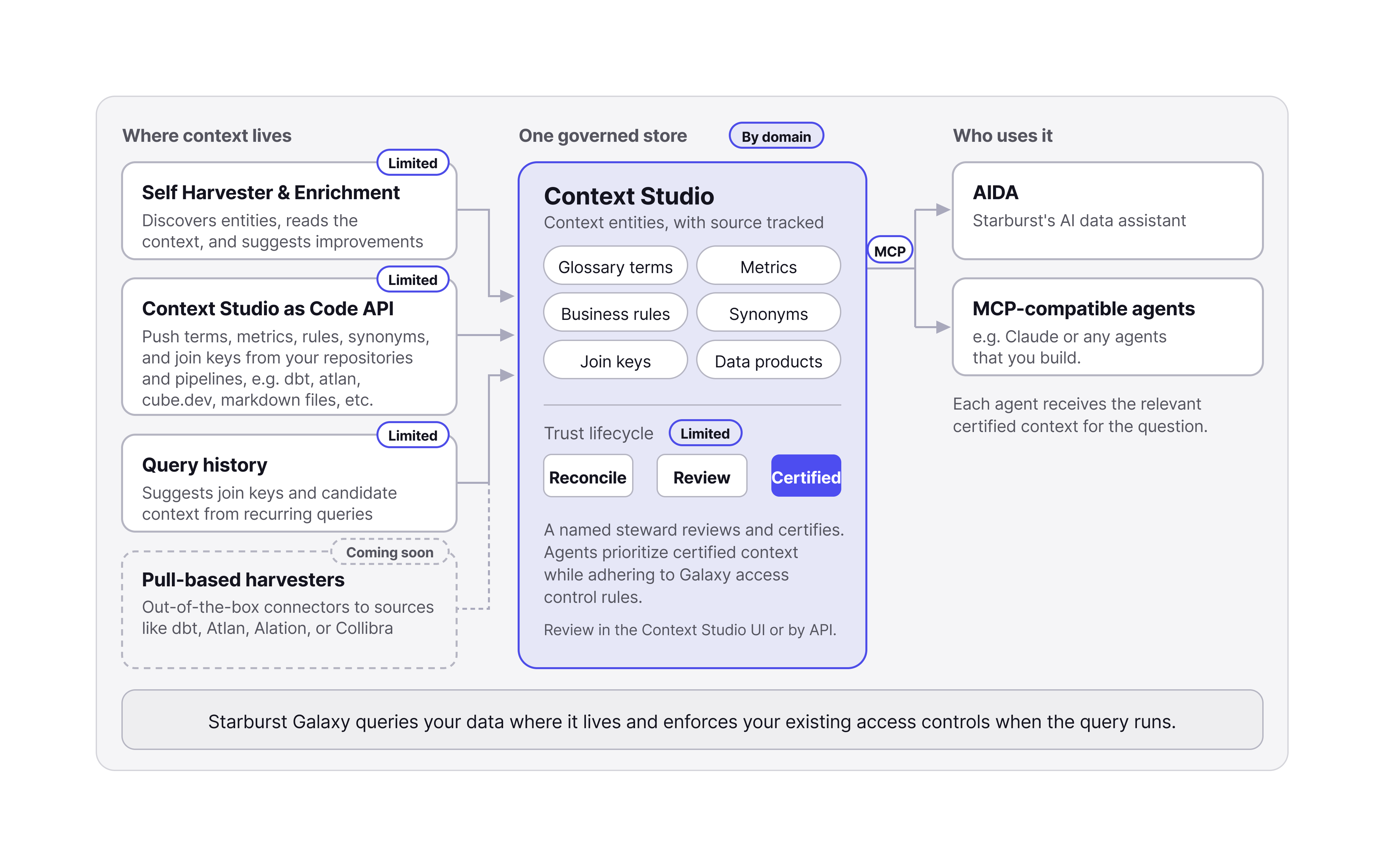
Context Studio collects that meaning into one governed store. It brings together glossary terms, metrics, business rules, synonyms, join keys, and data products from the places they already live. A named steward reviews and certifies the context, and agents consume the certified context over the Model Context Protocol (MCP). Define the context once, and every connected agent, including AIDA and Claude, works from the same certified source.
What this changes for agents #
Consider a question an analyst might ask an agent:
“For our open AML cases, what is the net exposure under the new netting policy?”
To answer this question reliably, an agent has to know:
- Which table counts as a case
- Which statuses count as open
- How your organization calculates net exposure
- Which netting rules apply
- How relevant tables join
Context Studio holds each of those answers as certified context, gathered from many different sources, so the agent applies your definitions instead of inferring them.
How it works #
- Connect your sources: Use the Context Studio as Code API to push glossary terms, metrics, business rules, synonyms, and join keys from your repositories and pipelines. You can also leverage entities derived from your own Starburst Galaxy data products and query history, out-of-the-box.
- Reconcile: Context Studio combines context from every source into a single store and tracks the origin of each entity. Each push describes the full current state of its connection, so when you push a new version and an entity is no longer in it, Context Studio removes that entity from the store.
- Review and certify: A named steward reviews the context in the Context Studio UI or through the certification API and certifies what the business stands behind. Agents prioritize certified context. In the private preview, all context lands as certified while this capability is built out further.
- Connect your agents: Point AIDA, Claude, or any MCP-compatible agent at the Context Studio MCP server.
- Ask questions: Agents apply your certified definitions, metrics, rules, and join keys when they write and run queries. Starburst Galaxy applies the user’s access policy when each query runs.
Prerequisites #
To use Context Studio, you need:
- A Galaxy account enrolled in the Context Studio private preview. Contact your Starburst account team to request access.
- Administrator access to your Galaxy account, and access to the agent or AI client you want to connect.
Limits and support #
Usage limits during private preview are shared when your organization is onboarded and may change. For questions or help getting started, contact your Starburst account team.
Is the information on this page helpful?
Yes
No